Showing posts with label writing. Show all posts

Thursday, May 28, 2015

Awesome iPad App: Book Creator

image courtesy of Red Jumper
One of my favorite iPad apps is Book Creator by Red Jumper. This app is so easy to use that even kindergarteners can create stories with it. Yet it's so powerful that secondary students can use it to publish multimedia ebooks. It can be used in any subject area with any grade level. Publishing for students has never been easier! 

The free version of Book Creator allows you to create only one ebook. Unlimited books comes with an in-app purchase of $4.99. Schools can use Apple Volume Purchasing Program to buy it in large quantities for 50% off. There are iOS and Android versions available.

This short video gives you a quick overview of how easy it is to use.


Launch the app and select New Book.

Choose a book shape (Portrait, Square, Landscape).

The first page is the Cover. All other pages are designed the same way. Tap the + icon to select an item to add. 


Photos - accesses the camera roll for pictures students have saved from the internet or taken with the camera. Also use this option to import videos saved to the camera roll.
Camera - use the camera to take a picture and insert it onto the page.
Pen - can be used to create simple drawings to include on the page.
Add Text - create text boxes that can be moved around on the page.
Add Sound - can be used to import audio from the iTunes library or record student voices. A speaker icon is placed on the page, which, when tapped, plays the audio.

Elements can be resized and placed by dragging the blue dots in the corner.


Format text or layer graphics by tapping the i symbol in the upper right hand corner.


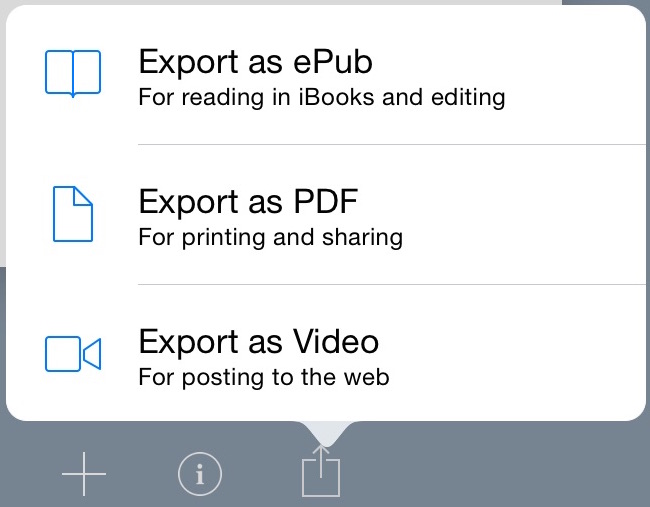
Final projects can be exported as ePub files, which can be viewed in any ebook reader, or PDFs. PDFs lack the interactive element of videos, audio, and page turning.


Integration Ideas


  • In a math classroom students can create a book to compare and contrast different methods of solving problems using text for directions and videos modeling each method.
  • In a primary classroom students can create a number or alphabet book.
  • Students can collaborate on a book with each student responsible for a chapter.
  • In the science classroom students can embed video of an experiment, examine the data, and write out a conclusion.
  • Create a book describing and showing the different types of triangle. Include audio definitions for each type.
  • Create an instructional sequence with each step or task as a chapter.
  • Create an interactive report on an animal or country, including pictures and text.
This blog post by Technology Coach Chris Loat on the Red Jumper website has some really good ideas for using Book Creator in the classroom.

Download the Tech Integration Challenge for Book Creator and see if you are up to the challenge!

Read More »

Friday, January 16, 2015

Digital Publishing Made Easy Webinar

Earlier this week I co-presented a webinar on digital publishing for K-12 teachers. My fellow presenters and I discussed why digital publishing is important in today's education. We then shared a few tools that can be used by students for digital publishing. We focused on iPads because of their flexibility and variety of tools. We also focused on web tools for those schools that don't have access to iPads.

The anchor standards from the Nevada Academic Content Standards for writing states:
Use technology, including the Internet, to produce and publish writing and to interact and collaborate with others.
In kindergarten it starts out very simple.
With guidance and support from adults, explore 6. a variety of digital tools to produce and publish writing, including in collaboration with peers.
As you move up the writing strand it becomes more complex in the secondary grades.
Use technology, including the Internet, to produce and publish writing and present the relationships between information and ideas efficiently as well as to interact and collaborate with others.
From just those simple standards we can see how important digital publishing is. It allows for student creativity, engages students more than paper and pencil assignments, and provides for an authentic environment and audience.

A playback of the one hour webinar is available at this link or by clicking the picture below.

Read More »

Monday, April 7, 2014

Adventures in student blogs and comments

I worked with a 2nd grade class today to get started on their blogs. We had been using a class login to make simple blog posts about what was happening each day. Students took turns writing the daily blog post. This gave them experience with the blogging format. Today we unleashed them to write their own individual blogs.

Before we started with individual blogs, I wanted students to have a good understanding of how to comment on each other's posts. Using an idea I read about from Pernille Ripp, Paper Blogs: A Lesson In Commenting On Student Blogs, Ms. Schrimpf, the classroom teacher, had the students write out an initial blog post on paper. I then talked with the students about what makes good comments: asking questions, sharing experiences, using details. I then gave each student a pad of Post-It notes and had them rotate around the class, writing their comments on the Post-It and then placing it on the paper "blog".

During this time the student engagement was 100%! There was total silence while the students were totally focused on reading their blog posts and writing their comments. 


After about 15 minutes the students came back to their own paper blog and answered any questions that someone may have asked. I put a few blogs and their comments on the document camera as we talked more about what makes a good comment and how students could have a "conversation" on their blog.

In the afternoon we went to the computer lab where students received their Kidblog login and made their first blog post. They were also allowed to comment on their classmates blogs. We only had 50 minutes for this part, but, again, there was 100% engagement!

Hopefully we can continue with this activity as students create more blog posts, either as a center rotation or as a homework assignment. Their initial enthusiasm and engagement is certainly exciting to watch!

ISTE NET-S Standards


  • 2.a Interact, collaborate, and publish with peers, experts, or others employing a variety of digital environments and media
  • 2.b Communicate information and ideas effectively to multiple audiences using a variety of media and formats

Resources

Read More »

Thursday, November 21, 2013

Cool and useful website: Wonderopolis

I first heard about Wonderopolis from a blog post I read last summer. Ever since, I've been thinking about how it could be used in the classroom.

Wonderopoolis is a site that inspires creativity, thinking, exploration, and, of course, wonder. Each day the site posts a new wonder that kids can explore. Some examples of wonders are: How Many Hot Dogs Can I Eat In 10 minutes? How Rare Is The Rhino? What Is Infinity? Each wonder is accompanied by a short video. Here is the video for the wonder How Do Pets Find Homes?


There is also a detailed discussion of the topic which includes vocabulary words. An interactive Wonder Words section helps students extend their understanding of the highlighted vocabulary words in the article.


Other sections of the website allow learners to explore previous wonders, submit ideas for new wonders, and vote on wonders others are thinking about.

How can this site be used in the classroom? The possibilities are endless! Here are just a few quick ideas:

  • watch the video and discuss what was learned
  • students write in their journal, blog, or on Edmodo about what they learned
  • draw and label pictures about the wonder
  • have students further research the wonder
  • take the Wonder Word Challenge and use the vocabulary words in a story or article about the wonder
  • have students select a previous wonder and write, blog, or post on Edmodo about it
  • assign the wonder as part of the homework for students to share with their family

What other ideas do you have for using this website in your classroom?

Read More »