Monday, April 13, 2015

#MysterySkype jobs

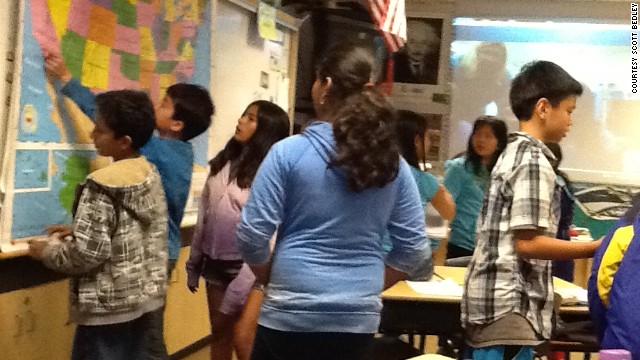
In order to make your #mysteryskype successful, it's important to have everyone involved. This means that each of your students needs a job to do. If you've ever watched a #mysteryskype in action, you'll actually see a lot of work going on in the room. And that's because there's a lot that needs to be done, from researching locations, to asking questions, to recording information.

What jobs you have your students do depends on your grade level and how many students are in your class. There's lots of variations on #mysteryskype and many teachers do things slightly different. You need to look at your class and decide what's right for you. Here is a suggested list of jobs.


  • Greeters: Introduce your class to the guest class and goes over the rules. Once done greeting, they help where needed during Skype call. They could also be the ones to close the Skype call.
  • Questioners: They are the ones to ask the yes or no questions and are the voice of the class. They could also be the ones that answer the questions from the other class.
  • Answerers: If you have a lot of students you can designate a few to take turns answering the questions from the other class. They should know their state facts pretty well.
  • Mappers: Using clues that are given, this group will narrow down the location of the other class.  This group could be broken down into even smaller groups if needed. For example, some could be working with atlases, while others are using Google maps.
  • Logical Reasoners: Work closely with mappers.  This group will come up with questions to ask other class based on questions that have been answered.
  • Runners: Run from group to group relaying information, primarily taking questions to the Questioners to ask the guest class.
  • Question keepers: Record questions and answers from both classes. This can be done on butcher paper mounted on the wall or through a Google Doc.
  • Blogger: Takes notes and writes about the experience on the class blog.
  • Photographer: Takes pictures during the event to post on the class blog.

After doing a few #mysteryskypes with your class, it might be helpful to ask them what jobs they think they should have. They probably like to try different jobs, as well as have suggestions for job.

Some teachers like to switch jobs on a regular basis. Others like to have students apply for and keep the same job. Here is a job application developed by another teacher.

Read More »

Thursday, April 9, 2015

Finding #MysterySkype Connections


Now that you are interested in #MysterySkype, you might be wondering: Where do you find the classes to connect with? There are three simple ways that will get you a ton of connections to work with.


Skype in the Classroom Website

The official Skype in the Classroom website is a great place to start making connections. To start you'll need to login with your Skype ID or Microsoft ID. Next click on the Mystery Skype link at the top of the page.

On the next page you'll see two ways to find teachers who want to Mystery Skype. On the left side are some menus where you can filter by subject, age, or region. You can also see the contact information for those classroom teachers. If you choose United States as the country you will also be able to choose a specific state. Many teachers try to do a Mystery Skype with all 50 states and use this option to find classrooms in the states they still need.


Once you find a teacher you want to work with, click on their name and you'll be taken to their profile page. You can see a short bio, Skype lessons they are involved in, and contact information.

The other option is to use the interactive map. Click the blue Search the Map button, just above the first section. With the interactive map you can zoom in and out on any region/country/state. The closer you zoom in on a location the more teachers you'll find in that area that use Skype. Click on any teacher to be taken to their profile page.


While you are on the website be sure to check out the other awesome resources. Click on the Find a Lesson link and you'll see lessons from authors, scientists, and other experts. Your class can participate in and connect with any one of these global classroom projects. These are great resources to help your students have amazing learning experiences.

Twitter

If you are a Twitter user (and you should be) there is a vibrant and active community of teachers using the #mysteryskype hashtag. Tweet out your connection requests including this hashtag and be sure to include vital information such as the age/grade level of your students. You can even request connections from specific states or countries.

I have a column for the #mysteryskype hashtag in TweetDeck that I use to keep up on all things #mysteryskype. Teachers and classes use the hashtag not only for requests, but to share successes and ideas. Following the hashtag will introduce you to a lot of other teachers doing the same thing as you!

Lists

Several teachers maintain lists of teachers and classes that do Mystery Skypes. I've bookmarked these lists and no longer remember where they originated. If you are the owner of these lists, please let me know so I can give you proper credit!

Mystery Skype List - this one has almost 300 teachers listed from all over the US and Canada.

Mystery Location Sign Up - this list has names of classes from all around the world, sorted by time zone to make it easy for you.

Mystery State/Country - this list of over 500 names goes back to 2011! It was started and is maintained by Caren MacConnell.

Don't forget the Time Zone!

I always get excited when I make a connection with another state that we haven't Skyped with. The farther away the better, because I don't know if students will ever be able to visit those states. But I kept forgetting about the time zone! Sometimes it works out, other times we can't connect because we're not in school yet, or they get out too soon, etc. Plus with Daylight Saving Time I'm never sure what the time difference is.

A valuable resource that I've found is the Time Zone Converter. To use this simple tool, you select your city and the other state. You can search for them if you need to. Then click the green Convert time button and you'll see what time it is for you and what time it is for them. This is a great visual for me to make sure we can connect!


Just do it!

It may be kind of intimidating to connect with another teacher and invite them into your classroom. How will your students behave? What will the other teacher think? Will your students ask the right questions? Are they (or you) fully prepared?

Don't worry about it! The other teachers involved in #mysteryskypes are a great group of people and totally understanding. Mention that you are just starting and they'll be happy to guide you through the process.

Don't forget to read my Mystery Skype page for other tips about making your Mystery Skype session successful!

Read More »

Monday, March 30, 2015

The funnest game on earth: #MysterySkype

One of the most engaging activities I've ever participated in is a #MysterySkype. I've facilitated several Mystery Skypes in both 5th and 2nd grades since last year and in every case the students have been engaged and focused. They've cheered when they made a good guess and groaned when they realized their question was off-base. In fact, we just participated in one this past week where neither class wanted it to end, even after an hour of back and forth! Students also realized how much more they need to learn about geography - even for their own state!

Although Skype is primarily used, classes can accomplish the same thing in Google Hangouts and have a Mystery Hangout.

A Mystery Skype is a 30 minute critical thinking challenge where two classes connect. The goal for each class is to guess the other school's location, whether it's the country, state, city, or school name. Classes take turns asking yes or no questions, trying to narrow down the location before the other successfully guesses. 

Students hold a variety of jobs and use a variety of resources. We always set it up so that each student has something specific to do, whether its record information, research maps on the computer, ask and answer questions to/from the other class, or run information back and forth between groups.

Here's a two minute video demo to give you a visual idea.


Why would I want to participate in a Mystery Skype?

There are many skills that students can utilize through a Mystery Skype, including:

  • critical thinking
  • creates global awareness
  • geography skills
  • using resources to find information
  • collaboration
  • communication skills
  • creates partnerships for future projects
  • student-led

These are all important skills that students need to have, growing up in a global economy, but can't be measured or taught by any standardized test. 


Mystery Skypes can be done at any grade level and subject. Kindergarteners can do a Mystery Number or science classes can do a Mystery Element, for example. 

What do I need?

To participate you'll need a few things:

  • Skype or Google account
  • computer
  • webcam
  • microphone
  • a projector (optional) makes it even better to display the conference call on a big screen

Of course you'll also need geography resources to look up a locations you are trying to guess. Atlases and computers with web access are perfect for this.


Students love it!

Once you start, you won’t be able to stop. Mystery Skype has been the most engaging way I have found to hook students into learning about the world. Geography learning has never been so fun and student question asking abilities has improved out of this world!


Read More »

Tuesday, March 24, 2015

Edmodo Part 17: Grading discussions and comments

This post is the next in a series of posts to help schools and teachers that I work with get started with Edmodo.

Edmodo is a powerful tool for engaging students in meaningful conversations. Posting and commenting are easy tasks for both teachers and students. Sometimes as a teacher, you still need to draw a grade from the discussion. Assignments and quizzes have grading functions built in, but there isn't an easy way to hold students accountable for posting and commenting. The best way to do this is to use a rubric.

In order to use a rubric on a discussion or a comment you will first need to create an assignment in the gradebook. Check out my previous post Edmodo Part 5: Gradebook for directions. Your assignment might look something like this.


After creating an assignment you can then use a rubric to score the post or comment. Your rubric should be designed to capture what information you are looking for. Do you care about spelling and grammar? Or are you more concerned about the content and effective discussion? Here are two examples of rubrics that are designed specifically for Edmodo.

Example 1 (Word doc)
Example 2 (PDF)

After completing the rubric, enter the scores in your gradebook under that particular assignment.

Using rubrics to assess student posts and comments is a great way to ensure quality posts and commenting.


Read More »

Monday, March 23, 2015

CommonLit: enriching clasroom discussions

I recently read about a new website that has a lot of great potential for enriching classroom discussions. CommonLit is a site that creates thematic discussion questions to use with upper elementary and secondary students. These questions are paired with interesting texts that are free to download.

Here's a basic rundown of how it works. As a teacher you select a discussion theme such as America, friendship, or growing up.


You then select one of several suggested discussion questions. For example, I chose the theme Growing Up, which offered two questions: Should we value our youth? and What does it mean to be grown up?


This brings up a list of grade levels that are stocked with various authentic passages. These passages are presented as downloadable PDFs that can be shared with students electronically or paper. Passages come from various authentic sources, such as excerpts from books, speeches, and video transcripts. More text-based and discussion questions are included at the end of the PDF.

The website is relatively new and has only a limited number of themes, questions, and texts. However, new ones are being added all the time. This is a great resource to help start classroom discussions based on specific texts. Check it out and let me know what you think in the comments!

Read More »

Thursday, March 19, 2015

MysterySkype - where have you been?

I just discovered a really neat tool for displaying states or countries where your students have visited with during a MysterySkype. The website amCharts is used for creating stunning charts of any flavor, but also has free state and country maps. I quickly created one below to show the states that I've Skyped with.


To create your own map simply go to the Visited States Map page. Click on the states you want to highlight either on the map or in the list. You can even change the colors used on the map to indicate water, states visited, etc.


Once your map is ready, there are a variety of things you can do with it. You can share it using social media, such as Facebook and Twitter. You can download it as a pdf or jpg by clicking the share download icon in the upper right corner of the map.

Maps can also be embedded on a class website or blog using the HTML code provided on the page.

This is an awesome way to share with the world where your class has gone for a #MysterySkype!


Read More »

Tuesday, March 3, 2015

SBAC: It's not about the tools

I presented to my middle school today. The topic I was given was about the SBAC and technology. I was the last in a series of presentations by each of the departments. Each department addressed ways they are using technology to prepare their kids for the SBAC, usually by formatting their assessments or instruction to mimic the SBAC question formats.

Because they focused on tools, I focused on concerns teachers have with the format and structure of the SBAC, as well as the advantages this type of test has over traditional multiple choice questions. I stressed that teachers need to focus on content and integrating tech skills into every day activities. In the end, students will perform well if they have deep understanding of the content. No amount of teaching tech skills in isolation will get around that.


SBAC - Created with Haiku Deck, presentation software that inspires

The presentation with presenter notes can be found here.


Read More »